MConverter Home
Blog
SmallPDF and MConverter logos

SmallPDF vs MConverter: Free Plan Comparison

What can you do for free with SmallPDF? Turns out, not that much, especially when compared with MConverter.
Roundups and Comparisons Document Conversion

The first result you get when searching for a “PDF compressor” is usually SmallPDF. Being the top result and not looking like A.I. slop does make this website appear reliable. But how useful is it really for its free users? To test this, I compressed and converted two files of 300 KB and 10 MB to compare SmallPDF’s capabilities against MConverter.

Quick Comparison#

Here is everything I discovered in short:

Free Plan on: SmallPDF MConverter
Compression Strength Basic Basic, Strong, Extreme
Daily Limit 2 files 15 files
Process Multiple Files No Yes, up to 8 files
Upload Size Limit 15 MB 100 MB
Supported Conversion Formats Very few A lot: Images, Documents, E-books
Subscriptions Free trial that often ends in unauthorized annual charges No misleading trials: Subscriptions start only with your express consent
Refunds On a case-by-case basis, usually refused Guaranteed refund policy

Now, let’s go into the details of each of these points.

Daily Limits#

Before using SmallPDF, there is no way to tell what their free daily limit is. To find out, I started compressing PDFs one by one and was surprised to find the free limit is only 2 files per 24 hours. While that is disappointing, the process of finding out that limit was even more annoying to me. The website allows you to upload and convert/compress a third file, but then puts a paywall when you try to download it. At this point, your only options are paying for Pro, signing up for the 7-day free trial, or waiting until the next day to process two more files.
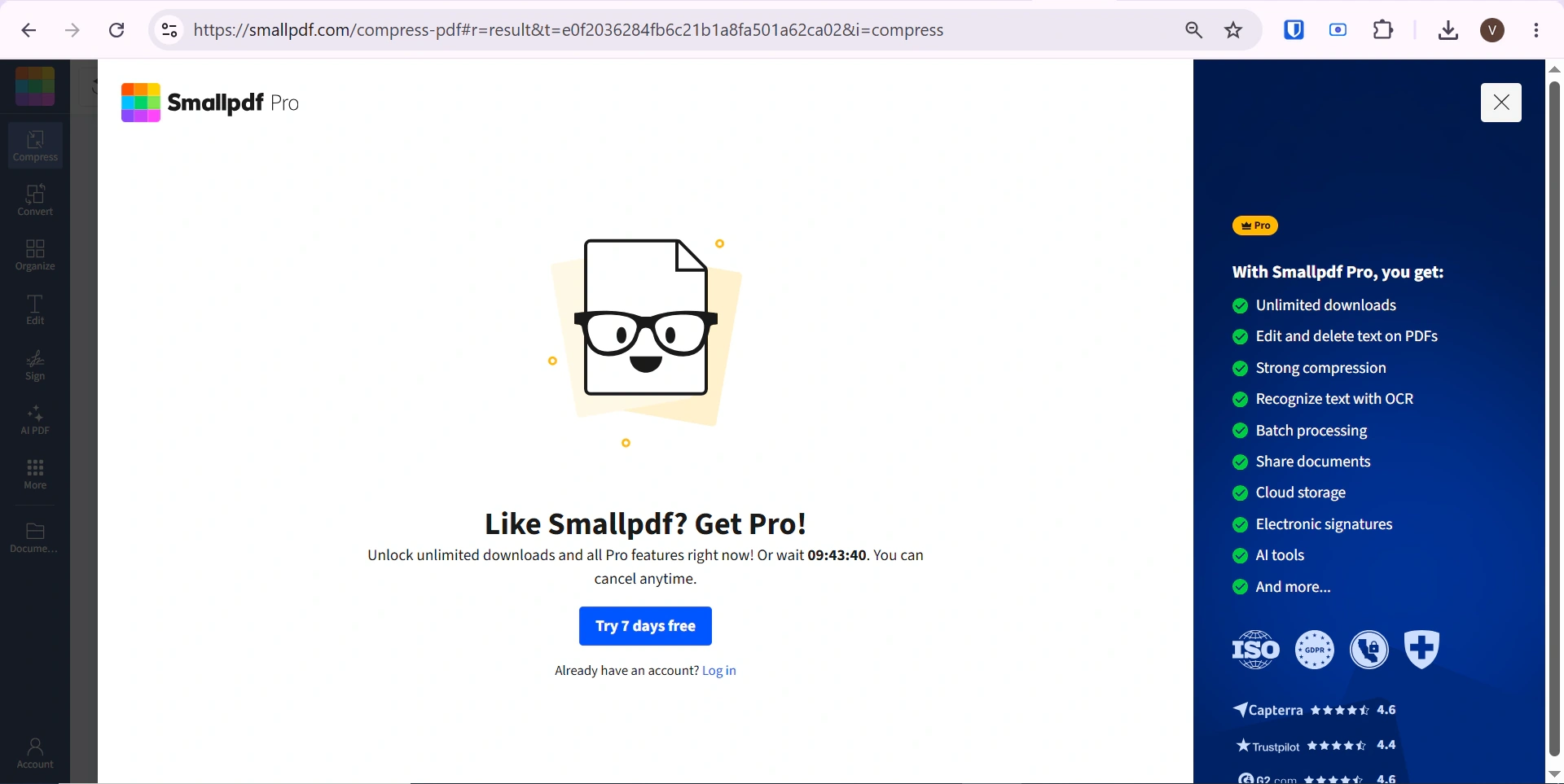
SmallPDF paywall after reaching the free daily limit

Luckily, MConverter offers a significantly larger free daily limit of 15 free conversions per day, no strings attached. Find out more about MConverter’s free plan here.

Batch Processing#

Batch conversion is the perfect feature for converting multiple files without constantly clicking around to process them one by one. Unfortunately, similarly to the hidden free daily limit, there was no information about the batch conversion limit of SmallPDF either. I tried batch converting 4 files only to find out that batch conversion is completely unavailable to free users. You cannot work with multiple files in SmallPDF for free.
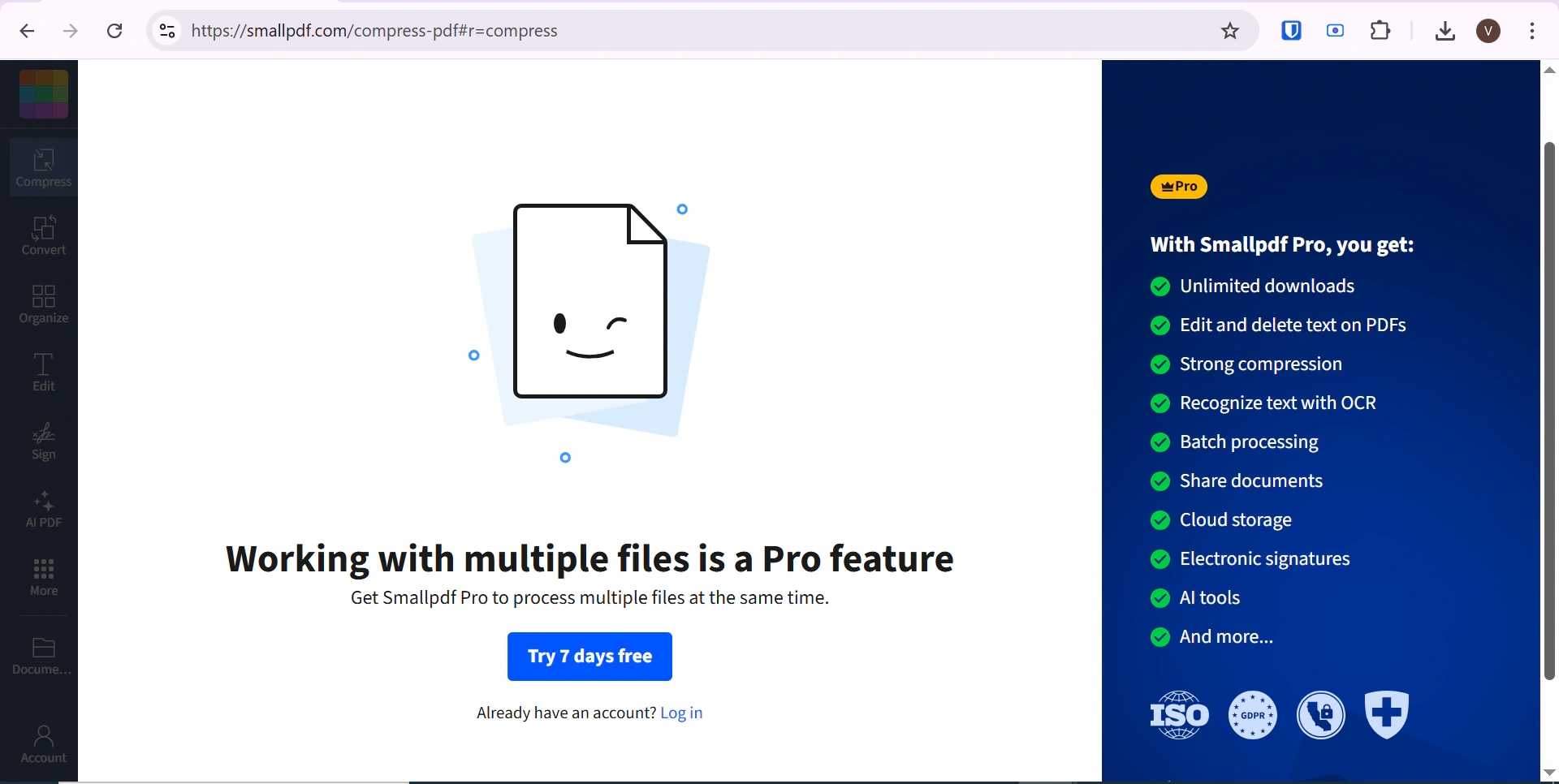
SmallPDF batch processing is a Pro-only feature

Contrary to what SmallPDF offers, all MConverter users can enjoy a free batch conversion limit of up to 8 files. A handy feature, especially when combined with the 15 free conversions per day.
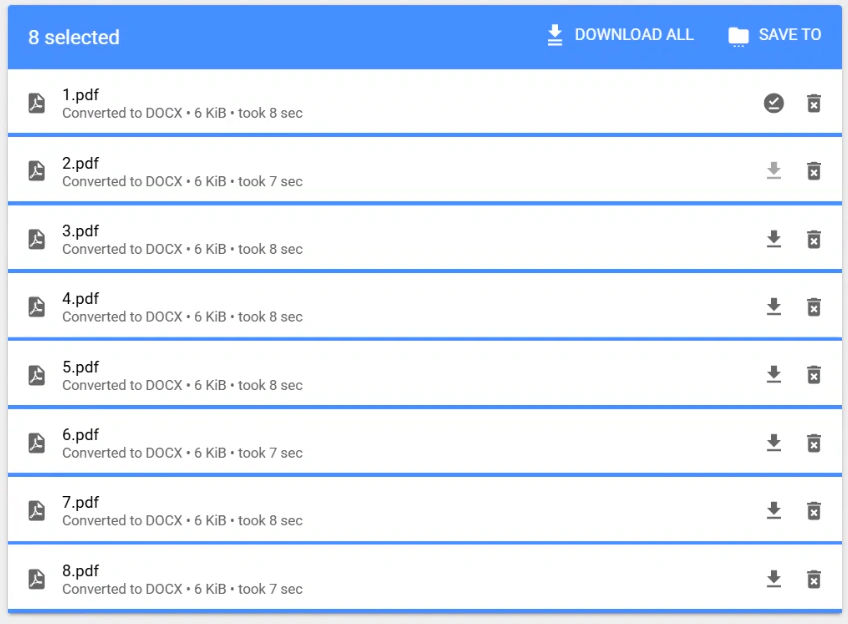
Batch-converting eight files with MConverter

Compression Levels#

PDF compression tools let you specify how much the file size should be reduced, at the expense of quality. The free plan of SmallPDF only lets you select the Basic level, while Moderate and Strong are locked behind a paywall, as is the Custom option.
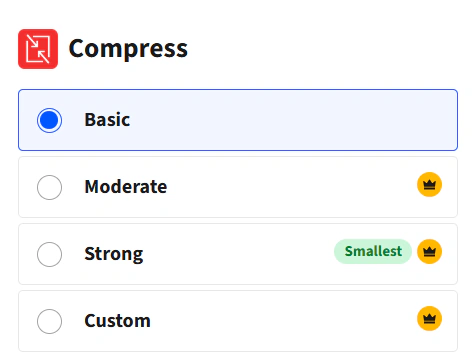
SmallPDF offers Basic compression for free while other levels require Pro

With MConverter, though, you can choose between all three PDF compression strengths for free: Basic, Strong, and Extreme. This freedom gives you more flexibility and lets you decide if you prefer preserving very fine details, or if you absolutely need to get that PDF under 10 MB so that you can email it. All for free.

Compression Results#

SmallPDF is most commonly used as a PDF compressor even though it can also be used for converting, merging and splitting PDF files. I decided to do a test compression of 2 PDF files of 300 KB and 10 MB to estimate how much smaller they actually get. The first one was reduced to 13 KB and the second to 198 KB making them both over 90% smaller than the original. That test also showed me that only Basic compression is available to free users.

Original size Compressed size Compression Type Reduced size in %
300 KB 13 KB Basic 96%
10 MB 198 KB Basic 98%

The text was just as easy to read as the original and the resolution of the images in the PDF was almost completely preserved.
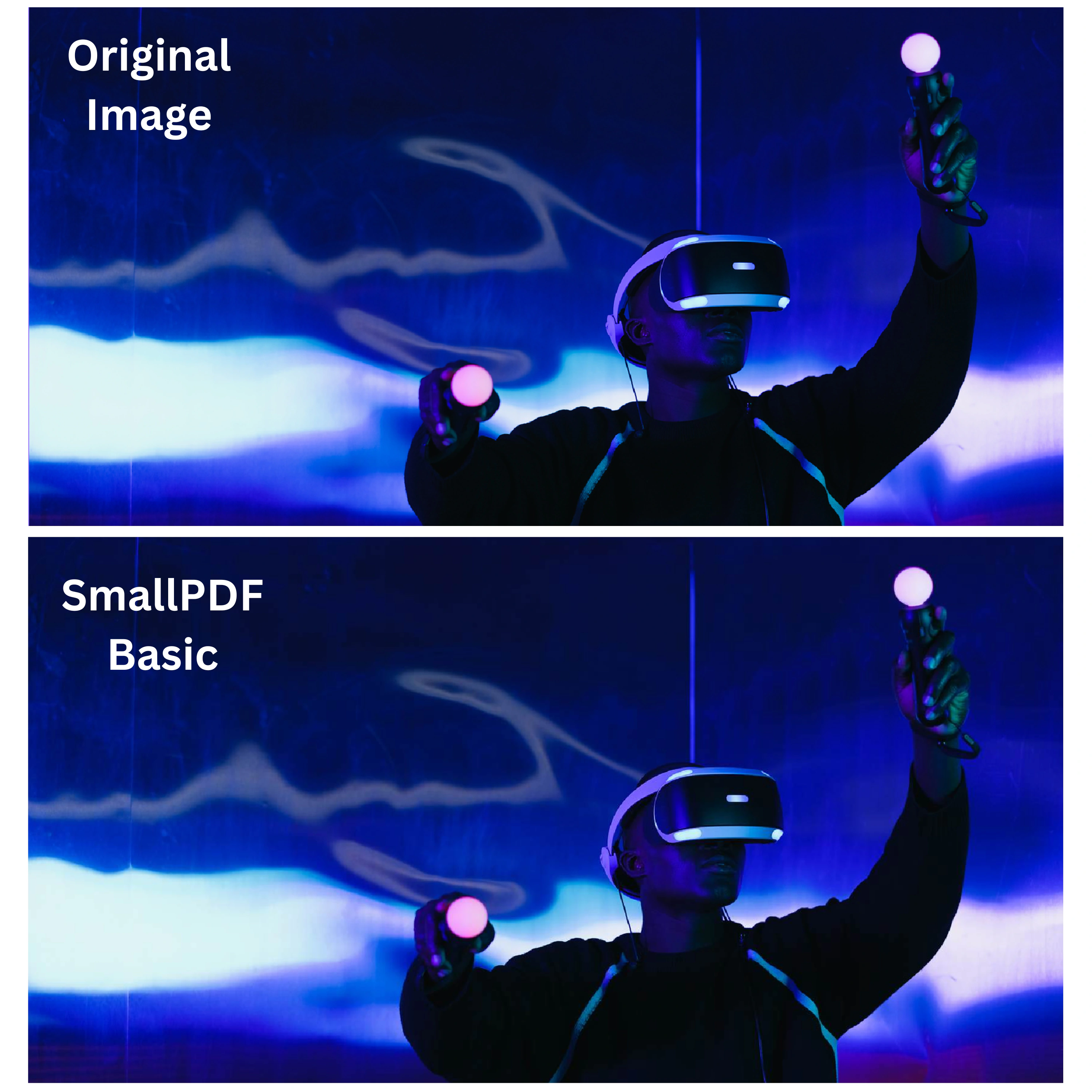
SmallPDF Basic compression quality compared with the original image

MConverter offers 3 levels of compression for all its users: Basic, Strong and Extreme. The Basic compression reduced the size of the 10 MB file by 86% and the 300 KB file by only 3%. The Strong compression reduced the larger file by 92% and the smaller file by 4%. Finally, the results from the Extreme compression were quite different with the 10 MB file being reduced by 96% and the 300 KB being reduced by 92%.

Original size Compressed size Compression Type Reduced size in %
300 KB 291 KB Basic 3%
10 MB 1424 KB Basic 86%
300 KB 289 KB Strong 4%
10 MB 801 KB Strong 92%
300 KB 23 KB Extreme 92%
10 MB 425 KB Extreme 96%

With MConverter the image quality was preserved during the Basic and Strong compression but distorted by the Extreme compression.
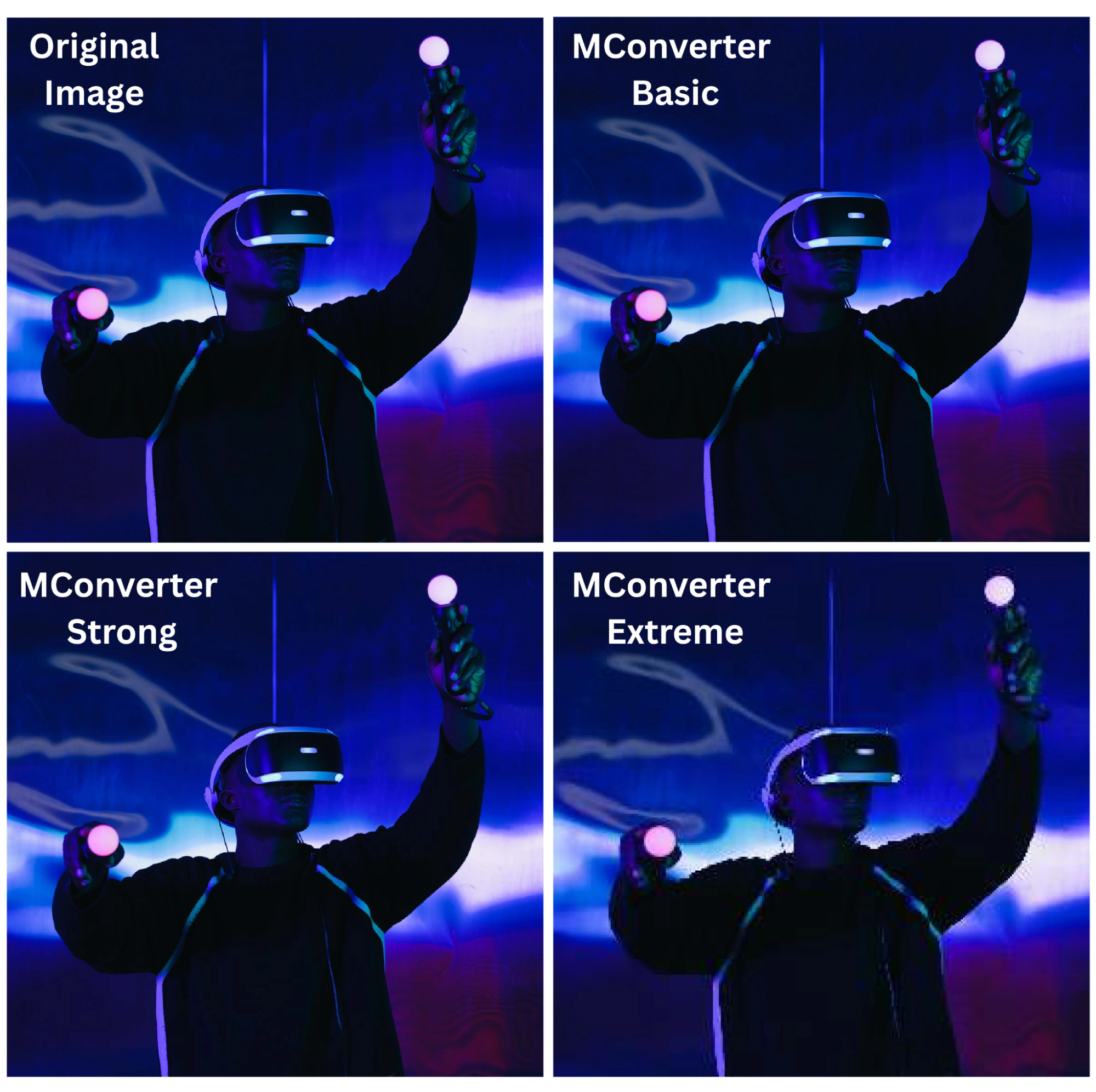
MConverter Basic, Strong, and Extreme compression quality comparison

Compression Speed#

Speed is another major consideration for this type of products, especially when you need to use them urgently. To compress a 300 KB PDF, SmallPDF took about 8 seconds, whereas MConverter took 1 second regardless of the compression level.

Before discussing the 10 MB file, it is important to remember that file conversion consists of 2 parts - uploading and compressing, and this difference is most noticeable with larger files. While the uploading is dependent on your internet speed, the compression speed is up to the website we use. For more objective results, I will only present the time spent on the actual compression. Both SmallPDF and MConverter needed 4 seconds to complete the Basic compression of the 10 MB PDF. However, MConverter needed 18 seconds to complete the Strong compression and 17 seconds to complete the Extreme compression.

Upload Size Limits#

You can probably already guess that the file size limit of SmallPDF was not disclosed in advance either. I attempted to convert a 100 MB PDF to Word, only to find out the limit is 15 MB. That may be enough for some ordinary documents, but it prevents free users from converting larger PDFs.
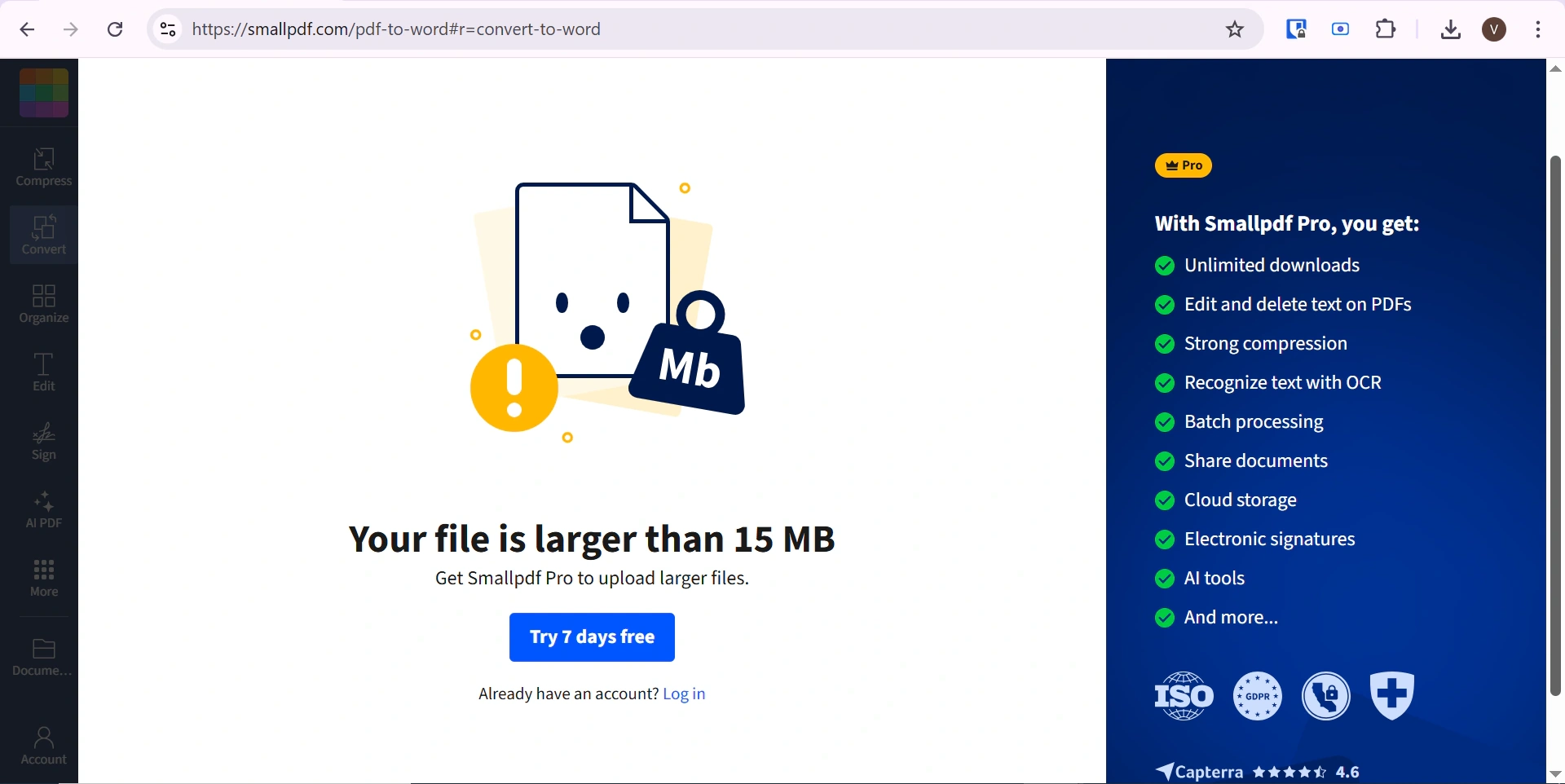
SmallPDF rejects files larger than 15 MB on the free plan

MConverter, on the other hand, can convert or compress files up to 100 MB for free. This makes it the more practical option when working with larger PDFs.

Conversion Formats#

With a focus on file compression, SmallPDF only offers 5 file formats to convert PDFs to. Two of which are the image formats JPG and PNG. However, when choosing to convert to an image, I always automatically received JPG images without the option to choose PNG. This potential error reduces the available conversion formats to 4. So while it does offer the basics, it cannot really be considered a full-blown file converter.

If you need to convert to a more specific or rare format, you may prefer MConverter. It has a large variety of file formats to convert PDFs to and from, including 5 E-book formats, 3 presentation formats, different text files, and many image formats.
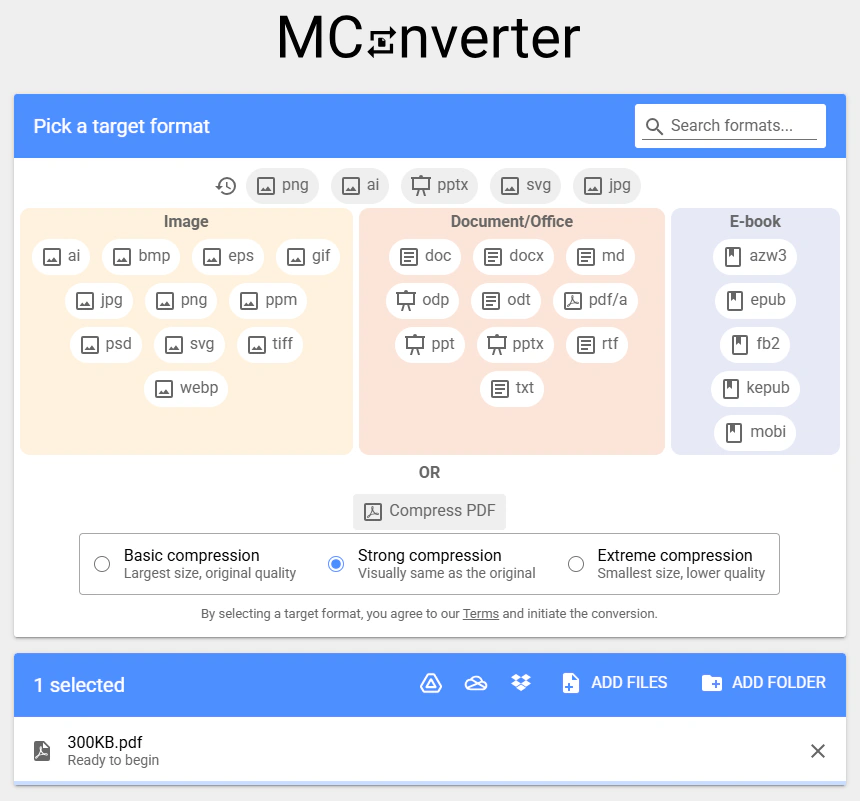
PDF output formats available in MConverter

Subscriptions & Refunds#

Due to SmallPDF’s limited free version of only 2 conversions or compressions per 24 hours, you may be tempted by their 7-day free trial. However, that requires you to make an account and fill out your credit card details. As can be seen in reviews from dissatisfied customers, this could allegedly lead to unexpected charges for a yearly plan if you forget to cancel your trial in time.
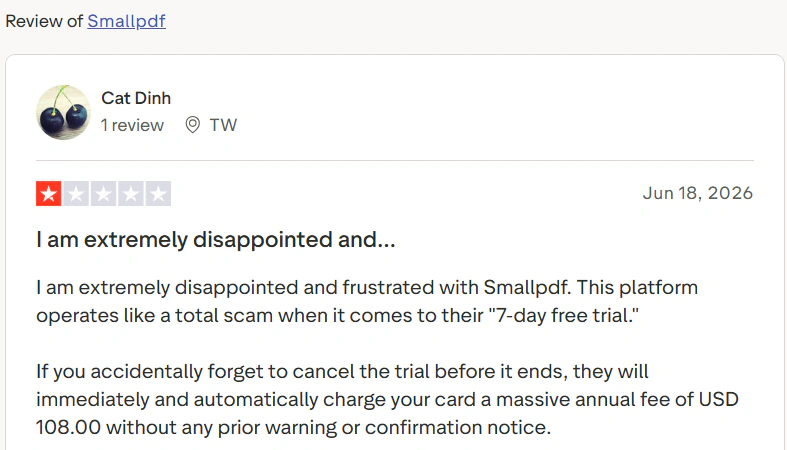
SmallPDF review reporting an unexpected annual charge after the free trial

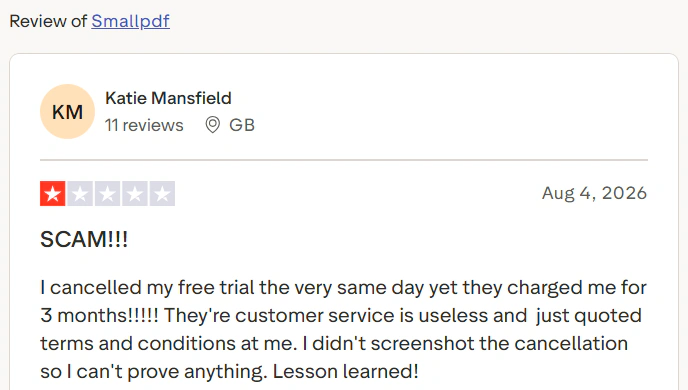
Other SmallPDF customers complain that even after cancelling their free trials and subscriptions, unauthorized charges allegedly continue:
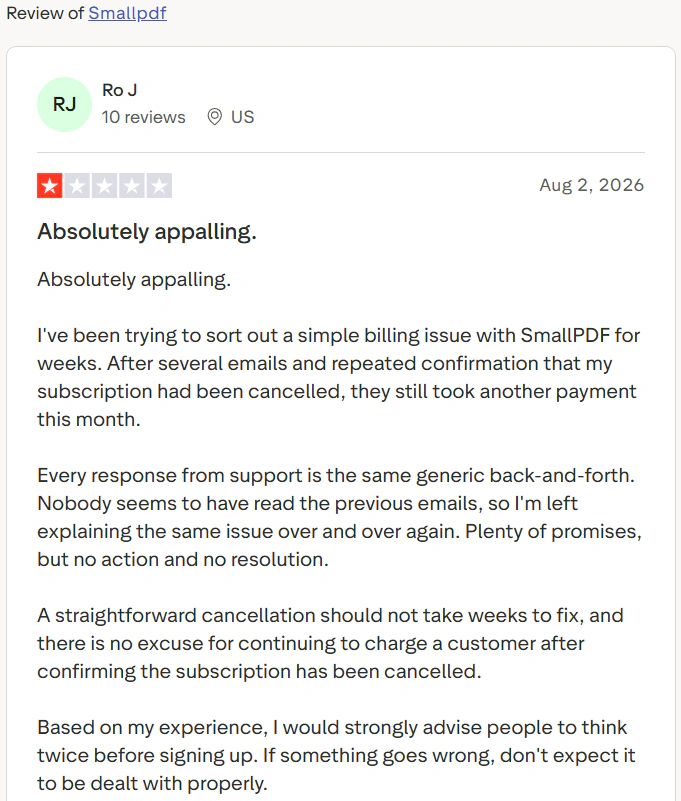
SmallPDF review reporting another payment after cancellation

SmallPDF review reporting a charge despite cancelling the free trial

As for their refund policy, SmallPDF offers no guarantees, and instead promises to work on a case-by-case basis:
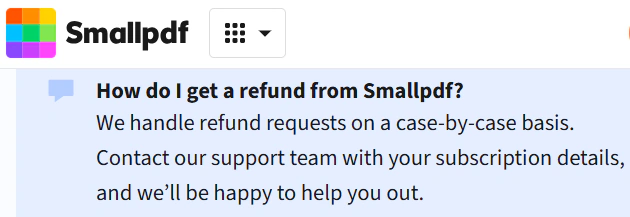
SmallPDF handles refund requests on a case-by-case basis

However, there are multiple customer complaints about refused refunds, even when the service was not used at all:
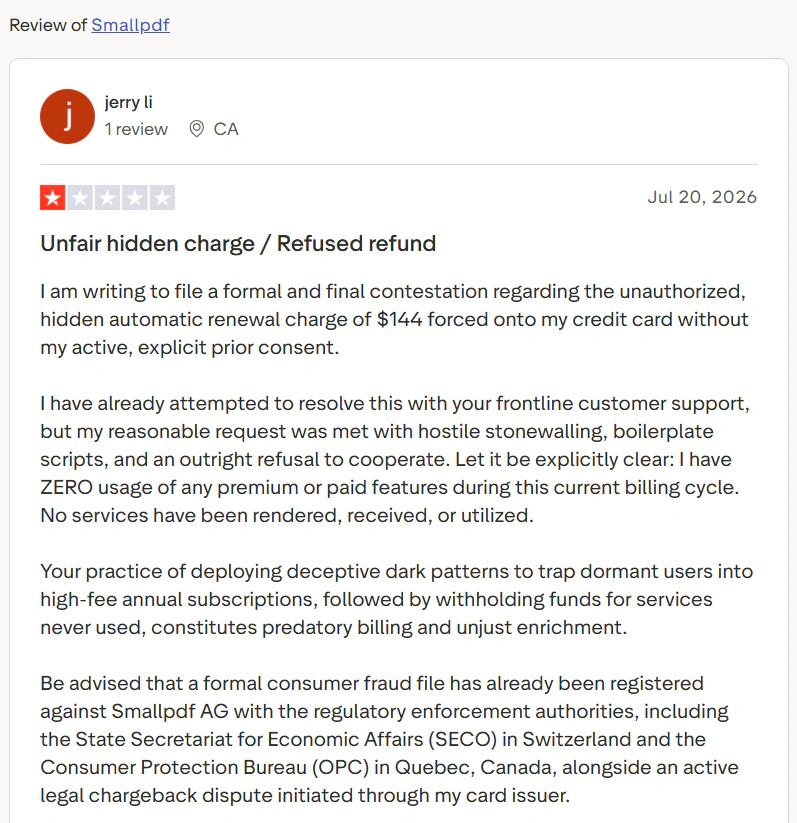
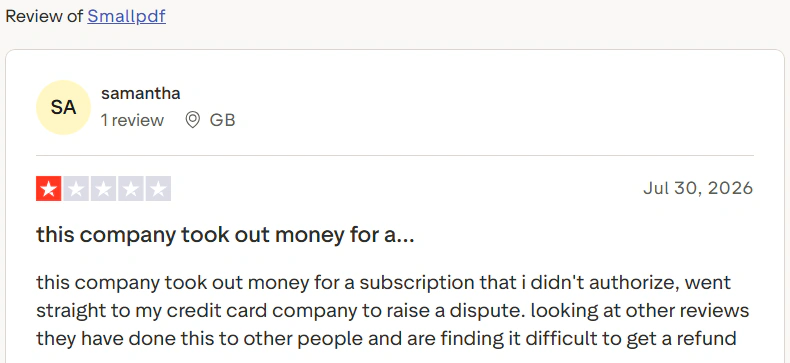
SmallPDF review reporting a refused refund for unused services

SmallPDF review reporting an unauthorized subscription charge and difficulty getting a refund

The abovementioned reviews are just a few examples from the last couple of months. There are more reports of similar experiences, which is why it is important to be careful when signing up for SmallPDF’s free trial.

For comparison, MConverter has a strictly guaranteed refund policy, available for all paid plans. As long as you haven’t used the product excessively, all refund requests are honoured. Note that on a case-by-case basis, MConverter also grants refunds in additional cases to those in the refund policy.

Summary#

SmallPDF’s free limit is 2 files per 24 hours, with no batch processing, and their 7-day free trial could bring you an unexpected paid yearly subscription. Contrast that with MConverter’s 15 free daily conversions and the ability to convert up to 8 files at once.

SmallPDF also only offers Basic compression to its free users, whereas MConverter unlocks all three compression levels for free. SmallPDF’s high compression rate is less useful due to the free plan’s size limit of 15 MB, which is significantly less than MConverter’s 100 MB. With a larger focus on file conversion, MConverter offers a wider variety of formats while SmallPDF only offers 5 file formats to convert PDF to (with PNG being impossible to select).

In conclusion, while SmallPDF offers high quality compression and conversion to all its users, it is outdone by MConverter when it comes to free daily limits, file size limits and variety of formats to convert to.


About the author

Vanissia has been creating educational content for MConverter since 2025, combining her background in Project and Change Management with a genuine passion for creativity. Through the educational articles and short videos she creates, she empowers users to confidently choose the format that best suits their goals. Her simplified explanations of technical processes help users better understand digital workflows, save time, and focus on more meaningful, high-value work.

LinkedIn


Check out more articles

MConverter on the App Store

MConverter is now available on the App Store

Our new app makes it even easier to convert or compress files on iPhone and iPad.
KEPUB and Markdown updates to MConverter

New file format and conversion types supported

MConverter can now process KEPUB files and convert more Office formats to Markdown.
Major MConverter conversion engine update

Major improvements to most file conversions

We’ve just rolled out a massive under-the-hood update that improves the quality of many conversions, while also adding new ones.
Download on the App Store Get it on Google Play Available on Samsung Galaxy Store Explore it on Huawei AppGallery Get it from Microsoft Store
Instagram YouTube LinkedIn Facebook

Made by humans in the 🇪🇺

My Account
Profile Picture
Loading...
Please wait
Action required
Downloads blocker detected
To stop seeing this message,
turn off Block automatic downloads
in Samsung Internet's Browsing pivacy dashboard settings.
To continue downloading your converted files, press the following button:
Loading...
Cloud File Picker

To select files from cloud storage, ensure you have its app installed.

It will show up in the Browse tab > Locations.

Download Files
Save to folder • BETA
Currently downloading
Downloaded to ...
Deep Search
Loading...
Google Drive File Picker
Conversion History

To access files you have converted in the past during previous sessions,
you need to:

Legal & Contact Details
Privacy Policy
Refund Policy
Settings


Share with other apps

Terms of Use
Referral Program Terms
Large file conversions are locked

Unlock converting files over

OR
To watch an ad, disable your ad blocker and Tracking Prevention
(if it's set to Strict) for our website. Then, reload this page.
Upgrade

Get more features

with our premium plans

Monthly
Yearly
Up to 40% off

Plus

  • Convert 250 files at once Learn more about concurrent processing
  • 1 GB maximum file size More details
  • Unlimited conversions per day
  • No ads
  • No branding in file names Learn more about branding in file names
  • Access conversion history
  • Human customer support
  • File Explorer/Finder integration More details

Pro

  • Convert 750 files at once Learn more about concurrent processing
  • 2 GB maximum file size More details
  • Unlimited conversions per day
  • No ads
  • No branding in file names Learn more about branding in file names
  • Access conversion history
  • Priority human customer support
  • File Explorer/Finder integration More details

Max

  • Convert 1000 files at once Learn more about concurrent processing
  • 10 GB maximum file size More details
  • Unlimited conversions per day
  • No ads
  • No branding in file names Learn more about branding in file names
  • Access conversion history
  • Priority human customer support
  • File Explorer/Finder integration More details

Rated Excellent (4.8) on Trustpilot
I love MConverter. It's fast, efficient and accurate. Suzan Vaughn
Awesome --- quick and error free. Exactly what I needed. Mark Evans
Using MConverter is like having a magic wand for file conversions. Marcin Otta
High quality. Did the job. And did it well. Highly recommend. Cody H
Totally awesome: I converted a short MP4 to png image sequence Xander Treffers
The only converter that gave awesome quality! Ksenia Novakova
Easy and fast. Jan C.
Click. Upload. Choose format. Download. Done. Thunderxbolt

Real stories from people who rely on MConverter

Arturo
Sep 25, 2025
I love that I can just convert my files from File Explorer, no need opening the app first, just right click and "open with" or the "Share" button and choose "MConverter" immediately or drag the file to MConverter home screen if I'm in a rush. Even though it's a web wrapper, it still serves a distinct purpose, compared to other website converters.
Fred Janning
May 5, 2025
What I appreciate most is how user-friendly it is. It handles just about any file conversion I throw at it, quickly and efficiently. It's become an indispensable tool in my daily workflow. The fact that it supports so many formats is a huge plus, and it's saved me a lot of time and hassle. It's a solid, reliable tool, and I'd definitely recommend it to anyone who needs to convert files regularly.
TorQue MoD
Mar 31, 2025
I love this converter! It's free and easy to use, and it successfully converted .mov with transparent background to .png with transparent background in only a few seconds. It will now live permanently in my Tools bookmark folder :)
Roger StH
Nov 28, 2024
Excellent tool, it does exactly what it says it will do. It does it really quick. No fuss, just upload your file in the web interface, select the output and the download of your formatted file begins almost immediately. Super fast !
Ashley
Oct 16, 2024
AMAZING APP! I am so glad I found it!! It actually converts WEBM files without the weird bleeds! It's the only app I use to convert cute emotes from any site! I have been looking for years to find an image/gif converter but all the ones I found didn't convert emotes correctly. MCONVERTER DOES!! Hands down, best app!
Nadeem Khan
Sep 30, 2024
Had a problem in opening rtf files on my cell while in a meeting, then searching Google and fortunately found mconverter and that solved my problem within seconds for free. Indeed the entire teams deserve to be highly appreciated for this incredible software. Hats off to all of them. wishing you more successful developments in future. Stay blessed ❤️
George Moore
Sep 12, 2024
BRO I HAVE BEEN TRYING FOR LIKE 5 YEARS TO GET A VIDEO FILE TO WORK ON MY CHEAP RUIZU MP3 PLAYER TO WORK, AND THIS THING DID IT PERFECT!!!!! 10/10
Jelena Arbutina
Sep 3, 2024
I tried several programs to convert [Adobe Illustrator] files to PNG, but only this program managed to convert both the text and the image exactly as in the original. The other programs transformed the text using their own fonts, which were not the ones originally used.
Lorenzo B.
Apr 18, 2025
(translated)
An exceptional product, with a fantastic, simple, immediate effective UX. A spatial combination of which format can be converted to which other format. A fast and flawless execution, with a very high quality of the output that maintains practically all the characteristics of the original document.
David I.
Dec 20, 2023
What truly sets MConverter apart is its Swiss Army knife-type functionality. This tool can convert anything to anything with just a click of a button. It doesn't matter whether you're working with audio, video, documents, images, or any other file type - MConverter has got you covered.
Whitney
Aug 28, 2024
(updated)
This app is exactly what I asked for and is super easy to use. I am not a big time computer wizard so I need apps that do what they say do in a straightforward process. This app does just that! I love it and will continue to use it and will advise others of it as well. Good job to the owners/developers! And, sincere THANK YOU!
Daniel Awesome
Aug 20, 2024
Finally found a converter that did webp to gif without killing the animation. I tried around 12ish different converters and this is the only one that works so far. Hats off to you dev, thank you.
Antonio Hurtado
Mar 16, 2022
The most fantastic, fastest, best and easiest file converter I have ever had installed on my mobile. You deserve all the praise possible, more than happy, I am super grateful, I will always be grateful to you for this super fantastic application. This super fantastic app has literally saved my life, now I can read novels and books in any format, including pdf, which has very small print, in epub format👏
matt32
Apr 6, 2023
AMAZING! This is the perfect file converter! The first thing I used it for was to convert WMV files to MP4 and it worked flawlessly. I then realized it supports all kinds of formats and is basically unlimited. The UI is very user-friendly and super easy to navigate. Incredible app, MConverter!
지나가던인간
Sep 22, 2021
(translated)
Although there are occasional errors, I was very impressed with the efforts of the developers to receive feedback from users and to improve the inconveniences quickly. I will be using it more often in the future.
Scott
Apr 28, 2022
I grab the webm I want to move to my phone and drag it over to the app, I click the type of file I want the webm converted to (mp4), it does it in 10 seconds. easiest 5/5 of my life.

Trusted by the world's top organizations

Google Nvidia

Frequently asked questions

Can I get a team discount?

Absolutely! We offer discounts on our annual plans for corporate organizations and academic institutions when setting up multiple accounts.

Can I use MConverter's paid plans on multiple devices?

Yes! You can use any paid plan on all your devices. Just sign in with the same account.

Can I pay for just 1 month?

Yes, after purchasing a monthly subscription, simply cancel your subscription to avoid future charges.

When can I cancel my subscription?

You can cancel your subscription anytime. Your benefits will remain active until the end of the current billing period.

What payment methods do you accept?

You can pay with a credit or debit card, Apple Pay, Google Pay, PayPal, and more:
Apple Pay Google Pay Visa Mastercard American Express Discover PayPal iDEAL Bancontact BLIK Pix UPI International

Can I get a VAT invoice?

Yes, a downloadable invoice is available for every transaction in your account. Just be sure to select "Add VAT number" during checkout if you are a business in the EU.

Are these auto-renewing subscriptions?

No, all prices are for one-off payments. They do not automatically renew. You pay only for the period you need.

Can I get a refund?

Yes! Unlike many other online file converters, we offer refunds because we are confident in the quality of our service. If you are not satisfied with MConverter, you may be eligible for a refund.
To check terms, refer to our Refund Policy.

Can I use MConverter for free?

Yes, you can use MConverter for free! Our Free Plan allows you to convert up to 15 files per day, with a maximum of 8 files at once and a size limit of 100 MB per file. Note that the daily limit may be reduced to 3 conversions depending on use.

For more features and higher conversion limits, check out our premium plans at the top of this page.
Already paid?
Payments are processed by .

Verifying Your Payment

This may take a second...